
CK444 Withdraw – Secure E-Wallet Withdrawal and Setup Guide
CK444 Withdraw allows members to request withdrawals through Bkash, Nagad, and Rocket directly from Personal Center. The interface provides e-wallet linking, transaction password settings, and balance verification before submitting a withdrawal. At CK444, members in Bangladesh can manage their payment information, monitor withdrawal requests, and review important requirements to minimize transaction errors and protect their personal funds.
আরও জানুন
Available CK444 Withdraw Methods and Transaction Limits
CK444 Withdraw supports three payment options: Bkash, Nagad, and Rocket, which are familiar mobile financial services in Bangladesh. CK444 displays a withdrawal amount range of ৳100 to ৳10,000 alongside a Withdrawal Time: 24 hours notice. Members should review the current transaction conditions because the displayed processing time does not guarantee that every withdrawal will be completed within 24 hours.
|
Withdrawal Method |
Payment Type | Required Information |
|
Bkash |
E-wallet |
Account holder’s name and Bkash account number |
|
Nagad |
E-wallet |
Account holder’s name and Nagad account number |
| Rocket | E-wallet |
Account holder’s name and Rocket account number |
How to Complete CK444 Withdraw Through an E-Wallet
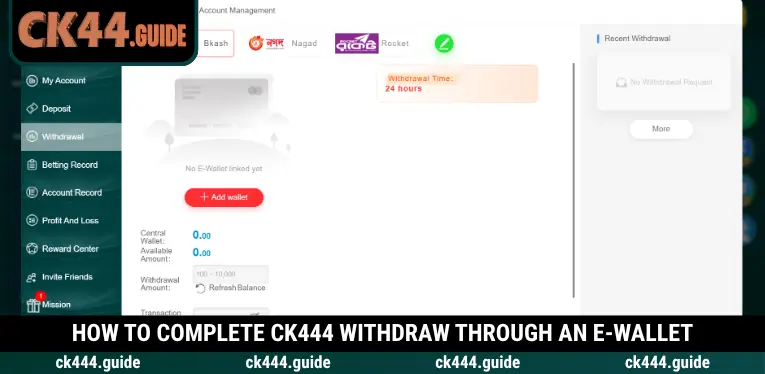
The CK444 Withdraw process takes place in Personal Center, where members can link an e-wallet and submit withdrawal requests. CK444 organizes Account Management, Withdrawal Amount, and Transaction Password settings within the same interface, helping users complete the necessary requirements before requesting a payment.
Step 1 – Log In and Open the Withdrawal Section
Visit the CK444 website, sign in to your account, and select Withdrawal from the navigation menu or Personal Center. The withdrawal interface will display Bkash, Nagad, and Rocket as available payment methods, along with your central wallet balance and other relevant transaction information.
Step 2 – Link an E-Wallet to Receive Funds
If the system displays No E-Wallet linked yet, click Add wallet or switch to Account Management to provide your payment details. During CK444 Withdraw, members must select the appropriate e-wallet, enter the account holder’s name, and provide the corresponding wallet number before submitting the linking request.
Step 3 – Set Up Your Transaction Password
In Account Management, enter a password in the Transaction Password field and repeat it under Confirm Password. CK444 uses the transaction password as a separate verification measure for financial operations, so members should create a secure password and keep it confidential.
Step 4 – Enter the Withdrawal Amount and Verify Details
Return to the Withdraw tab, select your linked e-wallet, and check the Available Amount before entering your preferred withdrawal value. Next, provide the Transaction Password if required, ensuring that the requested amount is within the displayed limits and does not exceed your available CK444 account balance.
Step 5 – Submit Your Request and Monitor Its Status
Click Submit to send your CK444 Withdraw request after completing all required fields. Members can monitor recent transactions under Recent Withdrawal or select More to access additional records, while keeping their transaction details available for future verification or support requests.
How to Link an E-Wallet for CK444 Withdrawals
Before submitting a CK444 Withdraw request, members must link an e-wallet if no receiving account has been registered. CK444 provides a dedicated Account Management tab where users can enter wallet holder information and manage their registered payment accounts through a structured form.
Enter the Correct Wallet Holder Name and Account Number
Open the E-wallet section, select your preferred payment service, and enter the required details in the Name on Card and Account Number fields. CK444 displays a warning that the recipient’s name must match the withdrawal information, as inconsistent details may cause a payment request to fail.
Review Your Registered E-Wallet Accounts
The Registered E-wallet section appears on the right side of Account Management and displays the wallets linked to your account. The provided CK444 Withdraw interface shows a status of 0/5, indicating that no wallets have been linked to that account and that five registration slots are displayed.
Complete Security Verification Before Saving
The e-wallet linking form requires members to configure Transaction Password and Confirm Password before submitting their information. Review the wallet number, account holder’s name, and password carefully, then click Submit to allow CK444 to process the payment account registration request.
Important Requirements Before Requesting CK444 Withdraw
To use CK444 Withdraw effectively, members should review their account status and any requirements that may affect payment eligibility. CK444 displays Central Wallet, Available Amount, and Remaining Number of Withdrawal Today, allowing users to check their available funds and withdrawal activity before confirming a transaction.
- Available Balance: Check Available Amount to determine how much money is currently available for withdrawal. Avoid entering a withdrawal amount higher than the balance displayed in your account.
- E-Wallet Information: Ensure the recipient’s name and account number match the registered payment details. Incorrect information may result in a rejected request or additional verification requirements.
- Transaction Password: Complete the Transaction Password setup before performing financial operations. Never disclose your transaction password or verification codes to unauthorized individuals.
- Bonus Requirements: Review any wagering conditions associated with promotional funds in your account. Bonuses that have not satisfied their requirements may not be eligible for withdrawal.
- Daily Withdrawal Availability: Check Remaining Number of Withdrawal Today to review the number of withdrawal requests shown as available. Actual limits may vary depending on account status and the platform’s applicable rules.
CK444 Withdraw Processing Time and Transaction Tracking
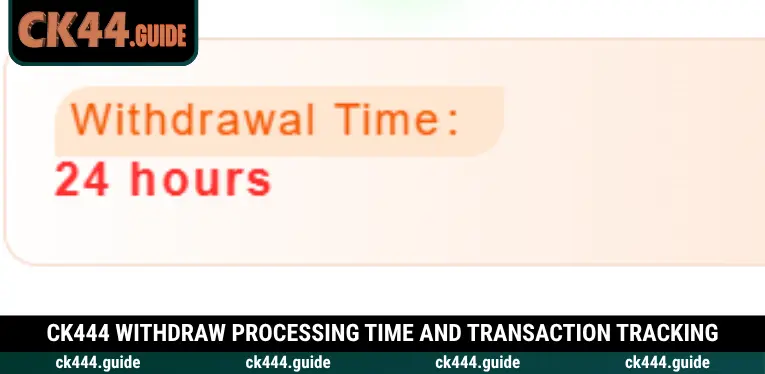
The CK444 Withdraw interface displays a Withdrawal Time: 24 hours notice above the payment form. CK444 also provides Recent Withdrawal, allowing members to review their latest requests and monitor transaction activity instead of relying solely on the estimated processing information displayed when submitting a request.
Actual processing may depend on account verification, the accuracy of the linked e-wallet details, and the payment provider’s procedures. If funds have not arrived, members should review Recent Withdrawal, compare their e-wallet transaction history, and contact support when necessary rather than submitting duplicate withdrawal requests.
Common CK444 Withdraw Problems and Their Solutions
During CK444 Withdraw, members may encounter difficulties when an e-wallet has not been linked, a transaction password is incorrect, or the available balance is insufficient. CK444 recommends reviewing the messages displayed in the withdrawal interface and completing any missing account settings before attempting another transaction.
|
Common Problem |
Possible Cause | Recommended Solution |
|
Unable to select a receiving wallet |
No e-wallet has been linked |
Open Account Management |
|
Submit button is unavailable |
Required information is incomplete |
Review all mandatory fields |
|
Invalid recipient information |
Wallet holder’s name does not match |
Verify and correct the details |
|
Transaction cannot be confirmed |
Missing or incorrect Transaction Password |
Check the transaction password |
|
Invalid withdrawal amount |
Amount exceeds the balance or limit |
Enter an eligible amount |
| Funds have not arrived | Request may still be processing |
Check Recent Withdrawal |
Essential Security Tips for Withdrawals at CK444
Completing CK444 Withdraw safely requires members to protect their e-wallet information and verify all payment details before submitting a transaction. CK444 encourages users in Bangladesh to maintain separate passwords, use payment accounts under their control, and follow the applicable account verification and withdrawal rules.
- Use Your Own E-Wallet: Link payment accounts with information that matches your personal profile. Avoid using another person’s wallet when doing so would violate the platform’s identity verification requirements.
- Protect Your Transaction Password: Choose a password that is difficult to guess and never share it with unauthorized individuals. Change your password if you suspect that your account credentials have been compromised.
- Review Details Before Confirmation: Verify the recipient’s name, wallet number, and withdrawal amount to prevent avoidable errors. Take extra care when updating payment information that has already been registered.
- Keep Transaction Records: Save your request reference, transaction time, and withdrawal amount for comparison with your payment history. Only provide necessary information through official support channels.
- Follow Account and Withdrawal Conditions: Review identity verification rules, promotional terms, and applicable laws in your location. Do not assume that funds or bonuses with unmet conditions are automatically available for withdrawal.
Conclusion
CK444 Withdraw supports payments through Bkash, Nagad, and Rocket, with e-wallet linking, transaction password settings, and balance verification available in Personal Center. Members should confirm their payment details, monitor withdrawal requests, and follow the displayed transaction limits. Visit CK444 to complete your account settings and submit withdrawal requests using the provided instructions while protecting your payment information and avoiding unnecessary transaction errors.

Hello everyone, my name is Malik Mirza. I am a gambling industry specialist with over 10 years of experience in the online gambling sector, particularly in the Bangladesh and Pakistan markets.
Throughout my career, I have contributed to the growth and SEO success of more than 10 gambling-related websites, helping them achieve top rankings for highly competitive gambling keywords in their respective markets.
In October 2026, my team and I founded Ck444.guide with the goal of creating a useful and reliable resource for online gambling enthusiasts. Through this website, we aim to share up-to-date promotional information, practical gambling tips, and helpful guides designed especially for new players who want to better understand the world of online gambling.